Title here
Summary here
Posted in linux on January 13, 2026 by Adrian Wyssmann ‐ 2 min read
Instead of managing ssh keys locally, you can use Bitwarden as a ssh-agent which IMHO brings some nice benefits, I want to show you.
Working with ssh (at least at home) you create your keys with ssh-keygen and place them in $HOME/.ssh. With Bitwarden the process is different:
At first you need to ensure you have bitwarden application installed on your system and app is running.
As a second step you have to create an SSH key in the WebApp or the Desktop app:
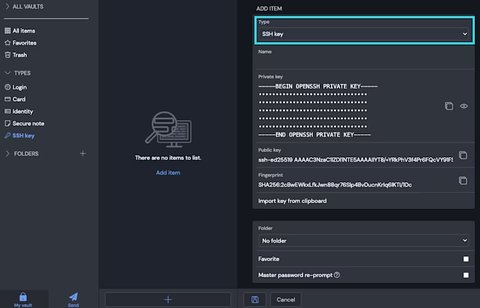
At this time, Bitwarden can only generate ED25519 type SSH keys
Tips
As a third step you have to tell Linux that Bitwarden acts as your SSH Agent
Configure the SSH_AUTH_SOCK environment variable to $HOME//.bitwarden-ssh-agent.sock
Tips
Configuration for other hosts may vary, hence check Configure SSH Agent
In the desktop app under Settings>Enable SSH agent you have to enable the ssh agent:
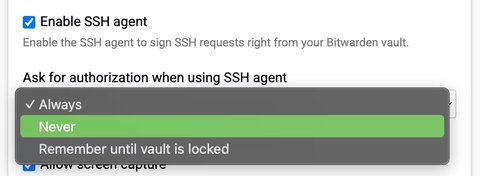
Get public key part of your key and add it to your target host - in my case for the user nixos
users.users.nixos = {
  openssh.authorizedKeys.keys = [
    "ssh-ed25519 AAAAC3NzaC1lZDI1NTE5AAAAIOrOn3Kj/+ztMtQAaq4pVvXgTsIs1ZOqQDbsA+nJMuRM nixos@homelab from clawfinger"
  ];
};Add the public key as a file e.g. $HOME/.ssh/[email protected]
Set the IdentityFile
Host 10.0.0.*
  User nixos
  IdentitiesOnly yes
  IdentityFile ~/.ssh/[email protected]
Now it’s ready to use. Let’s access our host:
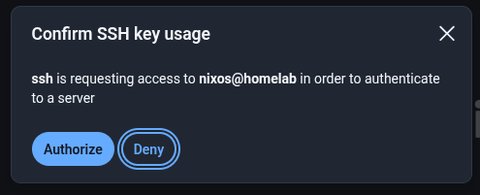
ssh 10.0.0.21If you are logged in and your vault is unlocked you will get a popup
$ ssh 10.0.0.11
Last login: Thu Jan 22 14:38:10 2026 from 10.0.0.154
~ %
There is a timeout, so if you don’t press this button in a certain time then the request will timeout and you will see something like
sign_and_send_pubkey: signing failed for ED25519 "/home/papanito/.ssh/[email protected]" from agent: agent refused operation
[email protected]: Permission denied (publickey,keyboard-interactive).If you are a Bitwarden user I believe it’s a great way to manage ssh keys especially cause the private key is no more stored on your local machine. Certainly you have properly protect your Bitwarden.